











Advertisement
Ultimate Flash Face
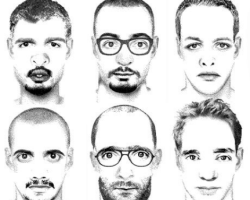
Ultimate Flash Face is a character creation game focused on assembling custom faces using a collection of visual elements. The player works within a static editor where facial parts can be combined, resized, and repositioned to form a complete portrait. There are no goals or progression systems, making the experience centered entirely on experimentation. Each session allows players to create one or multiple faces without restrictions on time or structure.
Face Builder Structure And Tools
The main interface of Ultimate Flash Face is organized around a central canvas with tool panels on the sides. Players select facial components such as eyes, noses, mouths, and accessories from categorized menus. Each element can be moved freely and layered on top of others. The editor does not enforce symmetry or realism, allowing a wide range of results. Changes are applied instantly, supporting continuous adjustment and refinement.
Customization And Visual Control
Customization in Ultimate Flash Face relies on manual control rather than presets. Players adjust position, scale, and orientation of facial features individually. Color options allow further variation, making it possible to reuse the same base elements in different ways. Because there are no automated constraints, results depend entirely on how elements are arranged. This open approach encourages exploration of combinations rather than following fixed templates.
Core Gameplay Elements
Ultimate Flash Face is built around a small set of consistent features:
- Selection of facial parts from categorized menus
- Free placement and layering of elements
- Manual scaling and positioning controls
- Color adjustment for visual variation
- Static canvas without time limits
These elements remain unchanged throughout use. Since there are no objectives or scoring systems, progress is defined by the completion of a face according to the player’s own criteria.
User Interaction And Creative Flow
Interaction is straightforward and relies on dragging, clicking, and adjusting sliders. Undo and reset options allow players to experiment without losing work. The lack of pressure or required outcomes supports a relaxed creative flow. Players can revisit and modify faces at any point during a session. Because results are immediate, the editor supports rapid iteration and comparison between different designs.
Advertisement


















Comments