





















Advertisement
Wiggly Paint
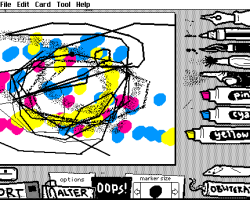
Wigglypaint is a browser drawing tool where the user creates animated doodles and saves them as GIF files. It is not a story game and does not include a campaign, characters with dialogue, or a mission system. The main purpose is to draw simple images with moving lines and export the result. The tool was built with Decker and is similar in idea to older drawing programs such as KidPix and Shake Art.
Drawing Instead of Story
There is no plot in Wigglypaint. The user does not complete quests, unlock chapters, or follow a character through events. The activity is based on choosing a drawing tool, making a doodle, cropping the image if needed, and saving it as an animated GIF. Because of this, the experience is closer to a creative editor than a traditional game.
Tools and Actions
Wigglypaint does not have levels. Progress depends on what the user decides to draw and how they change the image before saving it. The available actions are focused on making and exporting animated drawings.
The user can:
- select a drawing tool;
- draw lines on the canvas;
- create a wiggling animated effect;
- crop the finished image;
- test how the doodle moves;
- save the result as a GIF;
- share the finished animation.
How the Gameplay Works
The gameplay is simple because there are no enemies, timers, scores, or win conditions. The player interacts with the canvas and changes the picture through drawing. The movement effect gives the final image animation without the user needing to create many frames manually. This makes the tool suitable for small doodles, quick animations, icons, and simple GIF-style drawings.
How to Play
To use Wigglypaint, the player opens the browser version, chooses a tool, and starts drawing on the canvas. After the doodle is finished, the player can crop it and save it as a GIF file. There is no final level or ending. The session ends when the user finishes the drawing and exports the animation.
Advertisement



















































Comments