
























Advertisement
Veadotube Mini
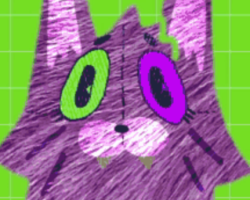
Veadotube Mini is a lightweight PNGTuber app for Windows, macOS, and Linux. It is not a traditional game with a plot, levels, quests, or enemies. The main purpose is to let the user create a simple speaking avatar for streaming or recording. The app switches between avatar images when the user talks, so the character can appear active on screen without a 3D model or face tracking. The official itch.io page describes it as an easy-to-use PNGTuber app for switching between two images while talking.
Avatar Setup
The user works with image states instead of story missions. A basic setup can include an idle image and a speaking image. More advanced setups can include blinking or different mouth states. The user imports PNG images, assigns them to the correct states, and checks how the avatar reacts to microphone input. The app is made for simple PNGTuber use, so it focuses on setup speed rather than complex animation systems.
Streaming Use
Veadotube Mini does not have levels or progression. Progress is based on preparing the avatar and connecting it with streaming software. The app can be recorded or captured in OBS, then placed over gameplay, a talking screen, or another video layout.
The user can:
- import PNG avatar images;
- set idle and speaking states;
- add blinking states;
- use microphone input for reactions;
- place the avatar in a stream layout;
- capture the app in OBS;
- use it on Windows, macOS, or Linux.
How It Works
The main interaction is technical setup. The app listens to the microphone and changes the visible avatar state when sound is detected. This allows the character to open its mouth while the user talks and return to the idle image when the user is silent. Veadotube Mini is also connected with the wider veadotube project, and the official site notes compatibility with avatars from HÖNK and PNGTuber Plus.
How to Use It
To use Veadotube Mini, the user downloads the app, prepares avatar images, assigns them to states, and tests the microphone response. After that, the avatar can be added to OBS or another recording setup. There is no ending or campaign. The session is complete when the avatar works correctly and is ready for live streams, videos, or online calls.
Advertisement















































Comments