





Advertisement
Wigglypaint
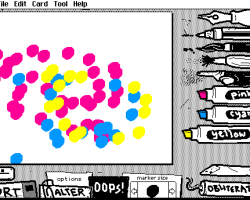
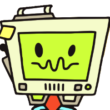
Wigglypaint is a small browser-based drawing tool made for creating animated doodles. It is not a traditional game with a plot, playable characters, enemies, or levels. The user does not complete missions or follow a story path. Instead, the main activity is drawing on a canvas and turning the result into a short moving image. The finished work can be exported as a GIF, which makes the tool suitable for simple animated sketches, icons, reaction images, or small visual experiments.
Drawing Without a Campaign
Wigglypaint has no storyline and no goal set by the game itself. The user decides what to draw and when the image is finished. The canvas works as the main workspace, and every session begins from a blank area. The process is based on making marks, checking how they move, and editing the visible part of the drawing before saving. Because there are no stages or quests, progress depends only on the user’s creative task.
How the Image Moves
The main feature of Wigglypaint is the automatic wiggling effect. The user does not need to create separate animation frames. After drawing, the lines receive a moving look, so the final image appears animated. This makes the workflow different from normal drawing programs and also simpler than full animation software.
The user can:
- draw on a browser canvas;
- use simple drawing tools;
- create a wiggling animation effect;
- make quick doodles or small pictures;
- crop the final image area;
- preview the animated result;
- export the finished drawing as a GIF.
Tools Instead of Levels
Wigglypaint does not include puzzles, scoring, combat, upgrades, or unlockable locations. There is no difficulty curve and no final level. The user interacts with tools rather than game systems. The main loop is to draw something, see how it moves, adjust the image, and save the result. If the drawing does not look right, the user can change the image or start again.
How to Start
To use Wigglypaint, the player opens the tool in a browser and begins drawing with a mouse or touch input. After the doodle is ready, the user checks the animation, crops the picture if needed, and saves it as a GIF file. The session ends when the image is exported or when the user begins a new drawing.
Advertisement








Comments