

















Advertisement
Tux Paint
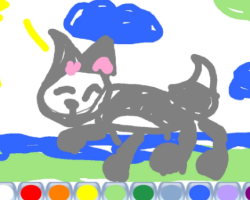
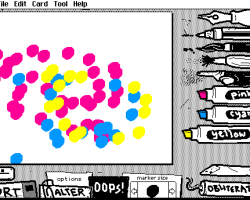
Tux Paint is an educational drawing application that combines creative tools with interactive elements. Rather than following the structure of a traditional game, it provides a workspace where players can create pictures using digital art tools. There is no storyline, character progression, or mission system. The experience is centered on drawing, experimenting with visual effects, and saving completed artwork for later use.
Getting Started With the Canvas
After launching the program, players are taken directly to a drawing area where they can begin creating images. A variety of tools are displayed around the canvas, allowing quick access to brushes, shapes, colors, and special effects. The interface is organized to make navigation simple and to keep the focus on creativity.
Players can start from a blank page or continue working on previously saved drawings. Since there are no restrictions on what can be created, every session can result in a completely different project.
Explore the Available Drawing Tools
Tux Paint includes numerous features designed to help users create digital artwork. Different tools can be combined to produce illustrations, patterns, signs, or simple sketches. Experimentation plays an important role because many effects produce different results depending on how they are used.
Some of the available functions include:
- Brush and paint tools
- Shape drawing features
- Color palettes
- Stamp collections
- Special visual effects
- Artwork saving options
These tools provide many possibilities for creating original designs.
Learning Through Practice
The game does not contain levels in the traditional sense. Instead, progress comes from becoming more familiar with the available tools and discovering new ways to use them. Beginners can focus on basic drawings, while more experienced users may create larger and more detailed projects.
Many features include sound and visual feedback, helping players understand how different tools work. This makes it easier to experiment without needing extensive instructions.
Advertisement








































Comments